The Quick Tab Stop form allows a user to quickly enable or disable tab stops for a single field on any form. To setup tab stops for an entire form by user, refer to Tab Stop Maintenance.
To set the tab stop for a single field:
1.Select the field for which you want to set a tab stop.
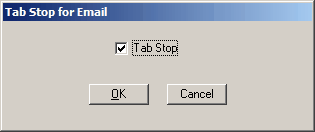
2.Press the F3 key on your keyboard to display the following form.
3.Clicking on the box will toggle the check mark between on and off.
4.Click OK to save the tab stop
Field Descriptions
Name |
Description |
Tab Stop |
This check box is used for determining whether the Tab key on your keyboard will set the focus on the field that is currently selected. Clicking on the box will toggle the check mark between on and off. If the check mark is on (checked), this field will have a tab stop enabled. If the check mark is off (unchecked), the tab stop will skip this field. |
|
Saves any change you made, and closes the form. |
|
Cancels any changes made, and closes the form. |

