The User Security reports option is used to provide reports that show which menu selections and which specific functions a user has been given permission to access. These reports should be used by the system administrator to review the current security settings and determine if changes should be made to lock certain users out of specific menu functions or tasks. The User maintenance option is used to adjust the security settings.
Screens
Name |
Description |
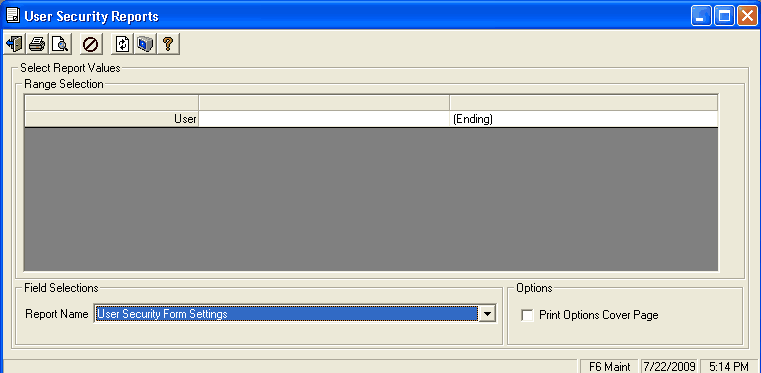
Enter run time prompts for the User Security Form Settings report. |
|
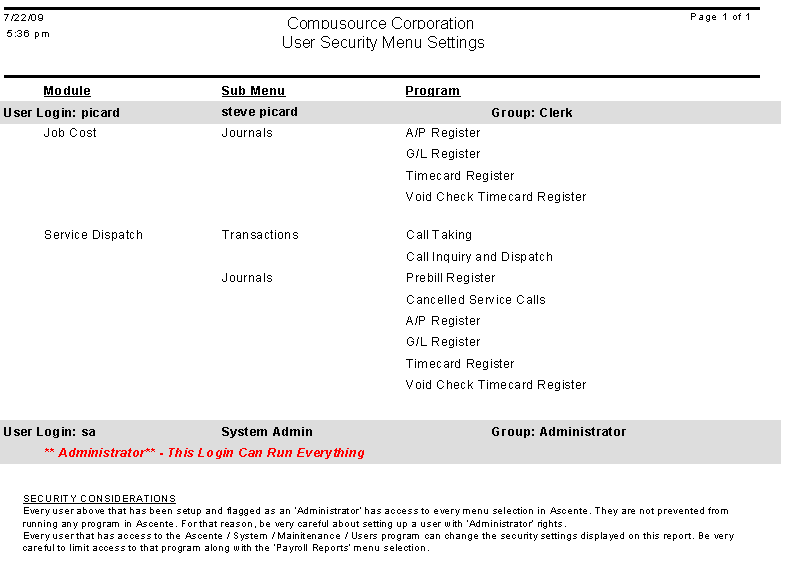
Enter run time prompts for the User Security Menu Settings report. |
Running a Report
1.Select the Report Name of the report you would like to print..
2.Enter a Password, if required.
3.Enter any selection values you want in the Range Selection Panel.
4.Check the Print Options Cover Page box if you would like your Range Selections to be printed on a cover page for the report.
5.Print the report with either the print  , or print preview
  , option.
User Security Reports Screen - User Security Form Settings
Field Descriptions
Name |
Description |
Range Selection |
The values in this panel are specific to the Report Name of User Security Form Settings. Leave values as (Beginning) and (Ending) to see all values of an item on the report. |
User |
Select the range of users you want to analyze. A lookup is available. |
Field Selections |
|
Report Name |
Select User Security Form Settings |
Password |
This field will only be visible if a password is required for the designated report name. |
Options |
|
Print Options Cover Page |
If this box is checked the system will print a cover page that lists the Range Selections that were made at the time you ran the report. |
User Security Form Settings Report Example:
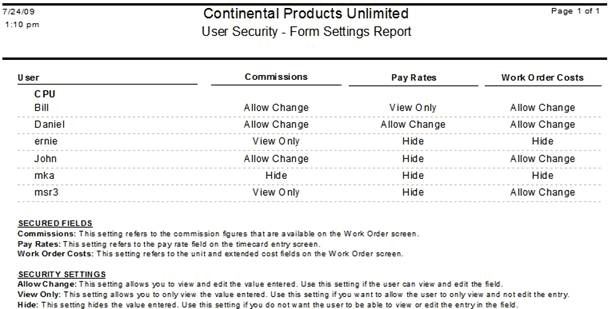
Note: If a user is NOT listed on this report, they have full access fields.
User Security Reports Screen - User Security Menu Settings
Field Descriptions
Name |
Description |
Range Selection |
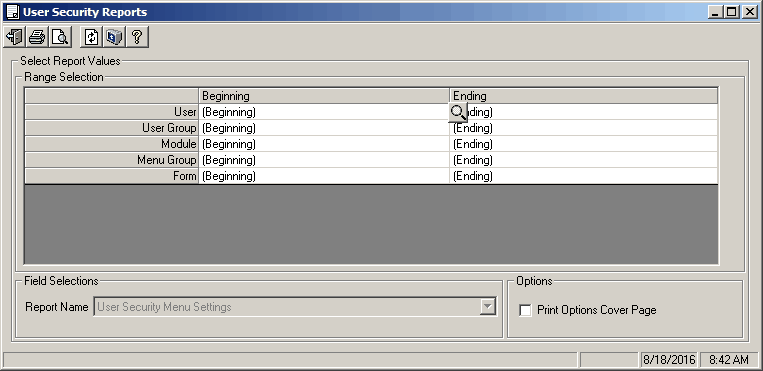
The values in this panel are specific to the Report Name of User Security Menu Settings. Leave values as (Beginning) and (Ending) to see all values of an item on the report. |
User |
Select a range of users to appear on the report. A lookup is available. |
User Group |
Select a range of user groups to appear on the report. A lookup is available. |
Module |
Select a range of modules you would like to see on the report. A lookup is available. This can be used to see who has access to specific modules (e.g. Accounts Payable). |
Menu Group |
Select the range of menu groups that you would like to see on the report. A lookup is available. This can be used to see who has access to specific menu subsections (e.g. Periodic or Maintenance). |
Form |
Select the range of specific menu items that you would like to see on the report. A lookup is available. This can be used to see who has access to a specific menu selection (e.g. invoice entry). |
Field Selections |
|
Report Name |
Select User Security Menu Settings |
Password |
This field will only be visible if a password is required for the designated report name. |
Options |
|
Print Options Cover Page |
If this box is checked the system will print a cover page that lists the Range Selections that were made at the time you ran the report. |
User Security Menu Settings Report Example: