The MoveTrak Control File contains various settings including the default MoveTrak categories. The default categories are used to automatically add MoveTrak records to the system as orders are added. You can set up three default MoveTrak categories for all Moving & Storage and Van Line orders. In addition, you can set up five default categories for each order type.
Screens
Name |
Description |
Set defaults for MoveTrak categories and actions. |
|
Enter up to five default categories for up to 36 order types. |
General Tab
Field Descriptions
Name |
Description |
|
|
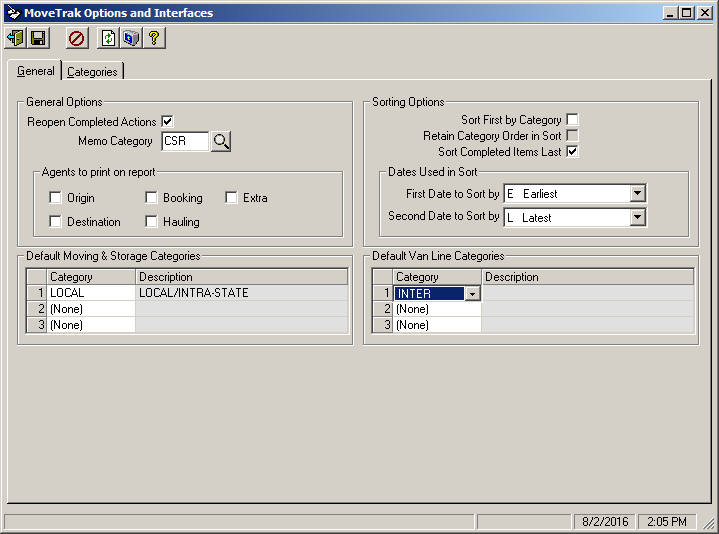
Reopen Completed Actions |
This option when checked allows you to open Actions that were already closed. By not checking this option, if you decide to reopen action, you will be required to re-add that action manually. |
Memo Category |
Enter the memo category that will be used when memos are created for custom user-defined actions. Use the |
Agents to print on report |
Select the agents that you want to be included on the MoveTrak Action reports. You may choose any or all of the following agents: Origin, Destination, Booking, Hauling or Extra. |
|
|
Sort First by Category |
Checking this box will cause actions to sort first by grouping actions from the same category together. This setting applies to the Action reports and the Action screens. |
Retain Category Order in Sort |
This option applies only to actions that were added from Categories. Checking this box will cause the actions to appear in the same order as they are in the category that they were added from, rather than sorting them alphabetically. This setting applies to the Action reports and the Action screens. |
Sort Completed Items Last |
Checking this box will cause completed actions to appear at the bottom of the action list for each order. This setting applies to the Action reports and the Action screens. |
|
|
First / Second Date to Sort by |
At least one of these dates must be selected for sorting purposes, and no more than two can be selected. This setting applies to the Action reports and the Action screens. |
|
|
Moving/Storage Orders |
Select up to three pre-defined categories that will automatically be added to all Moving & Storage orders. |
Default Van Line Categories |
|
Van Lines Orders |
Select up to three pre-defined categories that will automatically be added to all Van Line orders. |
 button to lookup memo categories.
Categories Tab
The settings on this screen allow for the entering of up to five default categories for each of the possible 36 order types. If default categories are not defined for a specific order type, then the default categories from the General screen will be used.
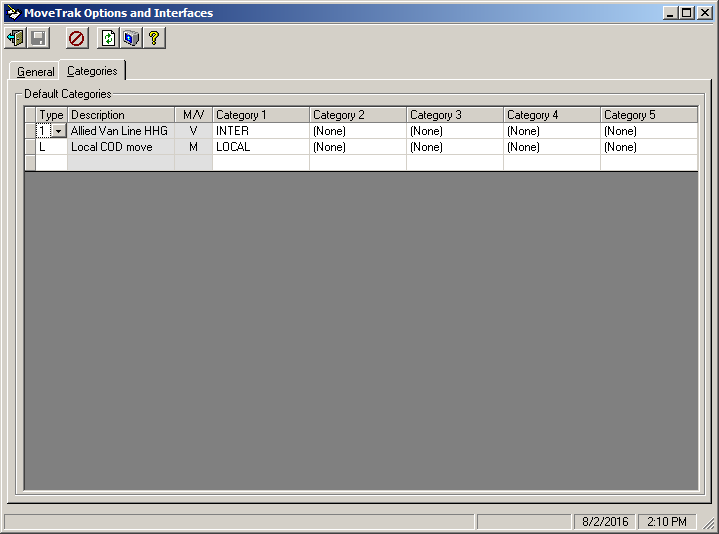
For order types 0-9 and A-Z that have been defined, enter up to five default categories, which will automatically be entered for each order of the type indicated. The lookup button can be used to search all categories.