
This section lists the improvements made within MoversSuite Administration - also known as the Admin Tool.
Account Setup
With Account Setup, two new fields are available: Default Client ID and Default Sub Account fields.
Once set with Account Setup, the “Default Client ID” and “Default Sub Account” settings will auto-populate within MoversSuite > Billing Information tab > the National Account section. These fields were requested by Atlas agents to support their billing processes; however, the fields are available to everyone.
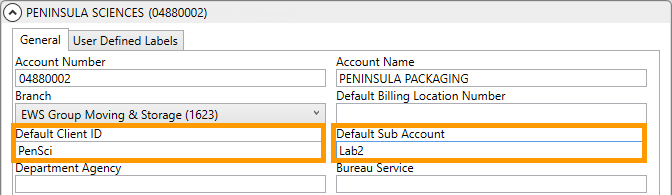
Figure 2: An Account Setup record with “Default CIient ID” and “Default Sub Account” set on that Account record.
See Version 2024.16 MoversSuite > Atlas Integration for details on these new fields within MoversSuite.
Refer to the Atlas Integration and Billing Information topics for usage more information.
Tables were updated to support this change. Refer to the Version 2024.16 Database Changes for details.
INTERNAL REFERENCE: MOV-5886
Account Profile
Setup 
The ability to add more than one email address was incorrectly disabled during a recent change within this setup.
Logic added during to a previous enhancement disabled the ability to add more than one email address to an Account Profile Setup record. This functionality has been restored. As a reminder, separate email addresses with a comma (Figure 3) or a semi-colon. If commas and semi-colons are not used, both email addresses will be ignored.
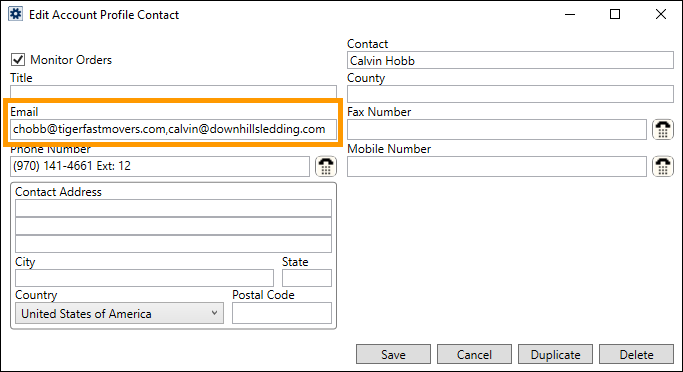
Figure 3: Two email addresses on an Account Profile Contact.
INTERNAL REFERENCE: MOV-7219