
This section lists the features, enhancements, and fixes added to MoversSuite and MoversSuite integrations.
CSI Pay
Integration
Card Type is shown within Cash Receipts.
CSI Pay now provides the card type on sales transactions. The card type will show as Credit Card, Bank Checking, or Bank Savings on all Cash Receipts.
RELATED INFORMATION:
Electronic and Online Payments
INTERNAL REFERENCE: MOV-7228
Atlas Integration / Billing
Information 
Client and Sub Account fields have been added to Billing Information.
Two new fields were added to identify the sub-client and sub-account for an account associated to an Atlas order. This information is needed to assist in billing.
These fields are located within the National Account section of the Billing Information tab in MoversSuite.
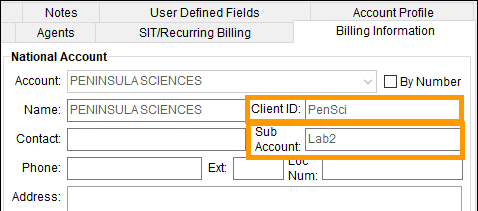
Figure 1: Client ID and Sub Account are set on the National Account section of this order within Billing Information.
Imports from Atlas will populate the new Client and Sub Account fields using the following references:
•Reference Type CLI to populate “Client ID”
•Reference Type of SUBACT will populate “Sub Account”
In addition to the data coming down from an Atlas Order Download, the defaults can be set within Account Setup. See Version 2024.16 MoversSuite Administration > Account Setup for information on these new two fields or see Account Setup.
Note that you can update the Client and Sub Account fields within the Billing Information. This data is saved to that particular order (and does not affect any default that may be assigned within Account Setup).
Tables were updated to support this change. Refer to the Version 2024.16 Database Changes for details.
INTERNAL REFERENCE: MOV-5886
Atlas Integration

Ignore Error 2037.
Error 2037 occurs when a hauling record does not contain driver information. Before this fix, the error would prevent any other data from being imported, including military data. With this fix, the error still appears but users are allowed to continue with processing the next import section.
INTERNAL REFERENCE: MOV-7192
Reductions
Reductions had a minor bug.
Reductions on allocated item within Revenue Group automatically recalculate upon any change within the Add Allocation Item function within the Add Revenue Group screen.
INTERNAL REFERENCE: MOV-7204