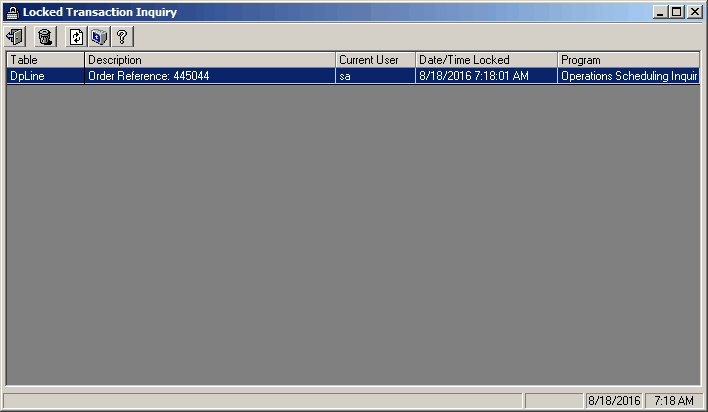
Locked Transaction Inquiry is used to view a list of records that the system has locked because someone is in the process of changing them. For example, when dispatching an order, the system will lock that order so that no one else can change it while dispatch is assigning tasks/manpower.
This inquiry can also be used to delete a lock that did not get cleared properly by the system. GREAT CARE should be taken when using this feature. A lock should only be deleted if you are positive that it is no longer valid. An example of when this might be used is if a workstation started process but then lost the network connection. The locks will remain in place, which will prevent anyone from accessing the locked record. You could then use this option and select all of the locks related to the disconnected user and clear them.
Note: If you delete a valid lock, the user's changes will likely be lost.
Screens
Name |
Description |
Displays all current lock transactions |
Locked Transactions
Field Descriptions
Name |
Description |
Locks Grid |
|
Table |
The table that contains the record being locked. |
Description |
A description set by the action locking the record. |
User |
The user that created the lock. |
Date/Time |
The date/time the lock was created. |
Program |
A description of the program/process that created the lock. |
Clearing Locks
1.Open Locked Transaction inquiry from the Menu bar under System, Inquires.
2.Note which records are locked, the user, date and time locked, and the locking program. If possible, contact the user and have them close the record to unlock.
3.Press the Refresh button  to see if locks have cleared on their own.
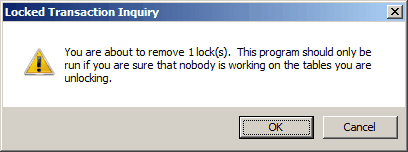
4.Highlight all of the lock transactions you want to clear and then click on the Delete button  You will get a message similar to the one below. Click OK to clear the lock.