This screen will print a report for a Customer Service Representative (CSR), or a range of CSRs, and can include several parameters from which to select.
CSR Action Report Screen
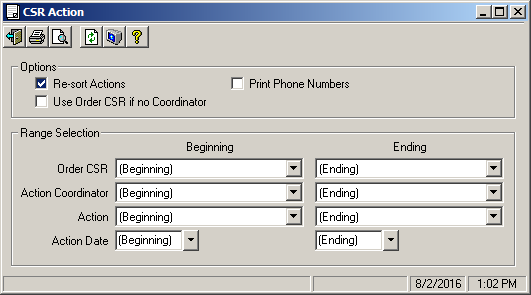
Field Descriptions
Name |
Description |
Options |
|
Resort Actions |
These option buttons are for choosing whether or not the actions should be resorted in the report. If this is the first time today this report is run, resort will be "Yes" by default. If not (a reprint), resort will be set to "No". |
Use Order CSR if no Coordinator |
This entry permits you to substitute the Order CSR for the coordinator on any action which is not assigned to a coordinator. If this option is checked and the coordinator for a action is blank, the CSR from the order will be used as the coordinator when determining if the action should be included on the report. If a coordinator is already entered for a action, it will be used. |
Print Phone Numbers |
Check this box if you want pertinent order phone numbers to print (longer report). |
Range Selection |
|
Order CSR |
These combo boxes are used to select a single CSR, or a range of CSRs. (Beginning) and (Ending) are used to select the first, and last CSR, respectively. |
Action Coordinator |
These combo boxes are used for selecting which Coordinators are to be included in the report. (Beginning) and (Ending) are used for first and last coordinators. |
Action |
These combo boxes contain a list of all the actions defined on the system. They are used to select a single action (same action in each combo box), or a range of actions to include in the report. |
Action Date |
Select the date range to include on this report. |