The Options and Interfaces (System) maintenance allows you to define system wide parameters for running Ascente.
Screens
Name |
Description |
Set defaults and options for the system. |
Payroll Overhead Percentrages
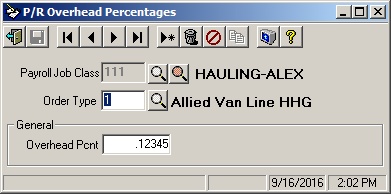
Field Descriptions
Name |
Description |
Payroll Job Class |
Enter the payroll job class code for which you want the Job Cost system to track the labor overhead. You must enter a code from the Job Class Codes file set up in the Payroll system (or use the lookups). |
Order Type |
Enter the order type for this overhead percentage. The order type must be a valid order type set up or *. If this field is set to * then all order types will use the overhead percentage entered here. Otherwise, the specific order type must be set up in this file or no labor overhead costs will be generated for Job Cost. |
General |
|
Overhead Pcnt |
This percentage is used by the Payroll System Update to create job cost labor overhead transactions. The program will multiply the employee's pay (for the indicated job class code and pay type) by this percentage to determine the labor overhead. Enter the percentage of the payroll gross labor costs to apply as payroll overhead. Items such as employee benefits, employer paid taxes, worker's compensation, etc. should be considered when establishing percentages. |