The Employee Productivity Report prints production information on each employee by order. Comparisons can be made between an individual employee and the company average for that type of work.
Screens
Name |
Description |
Enter run time prompts for the report. |
Running a Report
1.Enter your desired selection criteria.
2.Print the report with either the print  , or print preview
  , option.
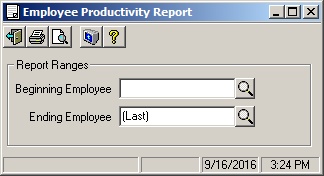
Employee Productivity Report
Field Descriptions
Name |
Description |
Report Ranges |
|
Beginning Employee |
Enter the lowest employee code to include on the report or empty for the lowest on file. Use the lookup |
Ending Employee |
Enter the highest employee code to include on the report or empty for the highest on file. Use the lookup |
 button to show the list of all employes.