The Login as New User option is used to change the login Vans is currently using to a new login, but without closing Vans and re-opening.
Screens
If any screens other than the menu are currently open then this option is selected, the the following warning will appear.
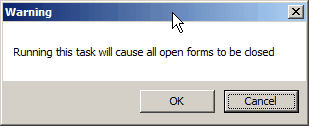
Click on Cancel if you have forms that you need to close manually to save any changes.
Once OK is selected the normal login screen will be displayed as shown below.

At this point you can now enter the new User ID and Password that you would like to login with.
Clicking on Cancel will shutdown Vans.