
This section lists the features, enhancements, and fixes made to MSWeb.
Tasks
Tasks based on the “Dependency Dates” of “Document Received” is active when adding documents within MSWeb.
Tasks based on “Documents Received” within Tasks Setup were reflected within MSWeb for documents added within MoversSuite; however, now this functionality is available within MSWeb. Add Documents within MSWeb by clicking the button indicated by the arrow in Figure 4.
As an example, a Bill of Lading document was added within MSWeb. Note, the Task Definition is set to Local Moves on the order (Figure 4).
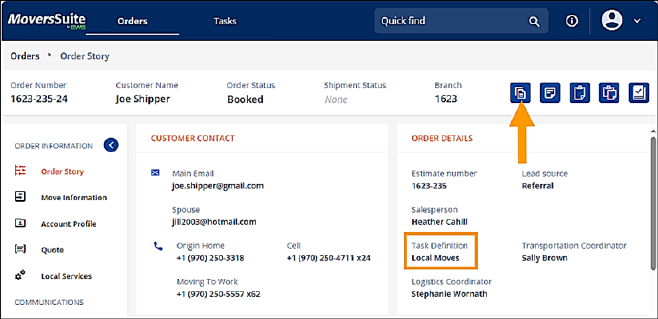
Figure 4: Click this button to add documents from within MSWeb.
A Tasks Setup record (Figure 5) is already set for Local Moves. On this record is a task that is based on the “Dependency Date” of “Document Received.” The document received is set to document Bill of Lading, which means that when a Bill of Lading is received the “Verify BOL” task is created.
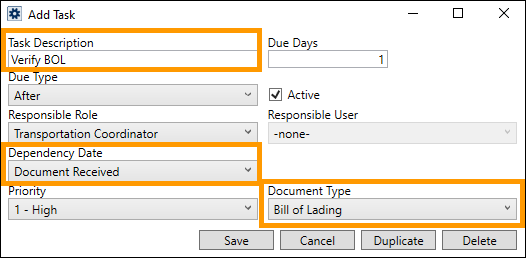
Figure 5: Task was added to Local Moves Tasks Setup record indicating the Document Received is based on Bill of Lading.
Now, since the Bill of Lading was added in Figure 4, the “Verify BOL” was automatically created and lists Tasks within the Order Story.
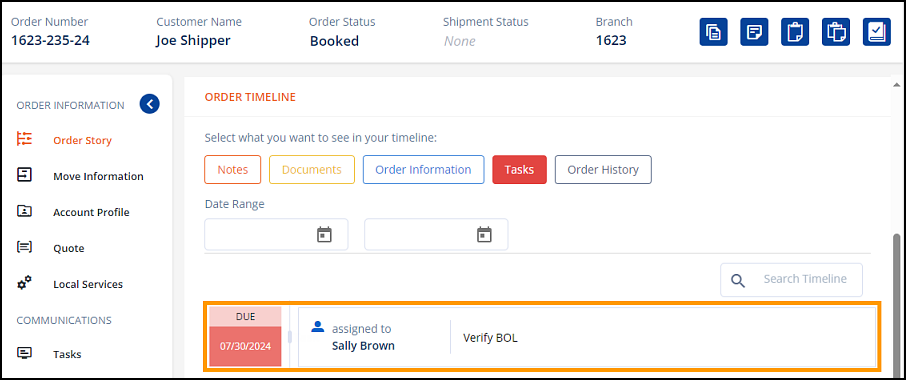
Figure 6: Tasks automatically created when BOL is received.
INTERNAL REFERENCE: MOV-7034