This section lists the enhancements added to MoversSuite.
MoversSuite Email Service
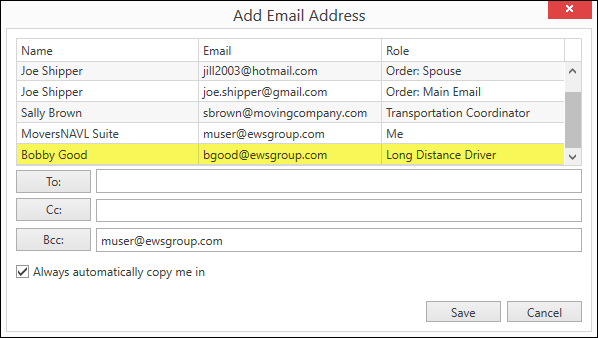
Long Distance Driver will be added to an Order’s Add Email Address list when that driver is associated to an order within Long Distance Dispatch.
When selecting email recipients through the MoversSuite Email Service, the Add Email Address listing now shows the Long Distance Driver. This option is available when the Long Distance Driver is associated to any trip that include the order in Long Distance Dispatch. The Long Distance Driver must be an active employee and have valid email address set within their Personnel Setup record to be included in this list.
Figure 1: Add Email Address dialog showing Long Distance Driver
INTERNAL REFERENCE:
MOV-6885
MoversSuite Administration
A Refresh button available to most admin screens.
The Refresh button  is now exposed through a new
button adjacent to the Mass Record Selection Options. This
option allows you to view sorted data while editing without having to exit the
setup area and come back in.
is now exposed through a new
button adjacent to the Mass Record Selection Options. This
option allows you to view sorted data while editing without having to exit the
setup area and come back in.
For example, if editing records within Equipment Setup and you press Refresh, the application will prompt you to save the changes and then update the sort to display according to the changes made.
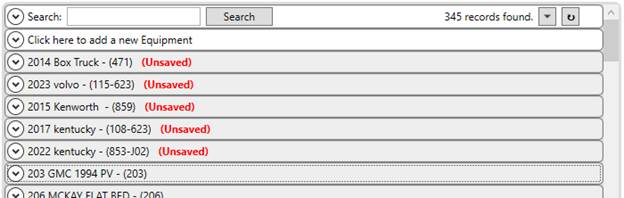
Figure 2: Equipment Setup with edited records
When the save completes, the updated records are now sorted alphanumerically by the description.
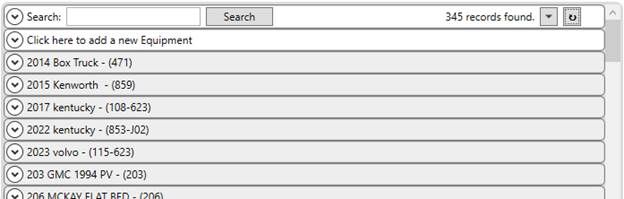
Figure 3: Equipment Setup after Refresh
Of note, the Refresh button was previously available as a Mass Record Selection Options prior to having it moved to its own button.
INTERNAL REFERENCE:
MOV-7022
MSWeb
A confirmation message appears when updating information on an Account Profile.
Since updating the Account Profile can update other settings on an order, MSWeb has been updated to prompt a user if the Account Profile is changed.
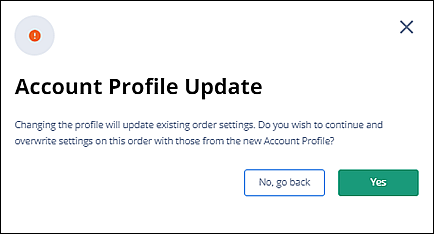
Figure 4: Account Profile Update confirmation dialog
Users receiving this confirmation prompt can press No, go back to not change the setting or press Yes to update the Account Profile on the order.
A similar confirmation displays within the legacy version of MoversSuite.
INTERNAL REFERENCE:
MOV-6716
MoversSuite Upgrade Process
Database Versions and Build Numbers show after each step of the upgrade process.
Previously, we only updated the database version and build number on the last upgrade step. This means that if a customer is upgrading through multiple versions encounters an error, we don’t know that last version that was successfully applied. Then, Engineering had to get involved to restart the process. Now, this information is available for Support to be able to address the issue more quickly.
INTERNAL REFERENCE:
MOV-7017