This section lists the features added to MoversSuite.
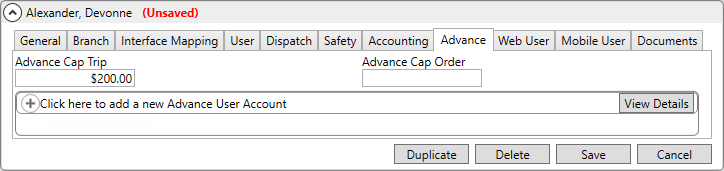
When editing records, “Unsaved” appears and will remain until either Save or Cancel is clicked.
Throughout the Admin Tool, when making any changes to records, (Unsaved) will appear indicating that changes have been made. Before this enhancement, in the busyness of our day sometimes changes were not saved, though we thought we did save them. This is a visual reminder that changes have not been saved and are pending. The caution remains until either the Save or Cancel button is chosen.
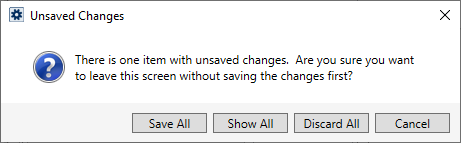
Should you try to go into a new area without choosing Save or Cancel, this warning appears indicating that there are unsaved changes.
Color Selector enables the ability to change the font color of items that have access to this new functionality.
Right now, Color Selection’s first use is the changing the font color of (Unsaved) - the new feature detailed above. We anticipate offering this fun functionality to other areas within MoversSuite Administration in the future.
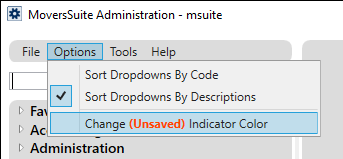
To change the color of (Unsaved), from MoversSuite Administration > the Options Menu, there is a new option named, Change (Unsaved) Indicator Color.
When clicked, the new Color Selector screen opens. Be sure to use the scroll bar to see all the colors available! Choose a color, such as Fuchsia which is chosen below, then click OK.
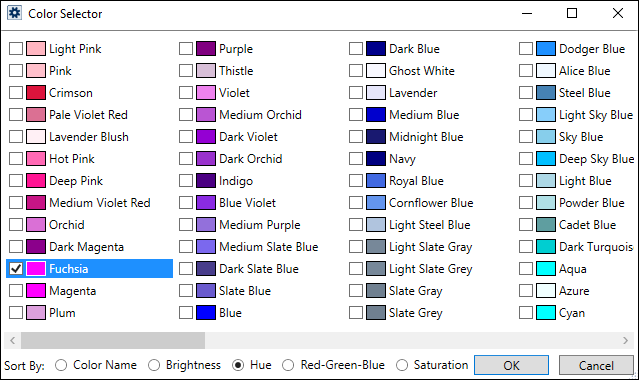
With setting this color selection, instead of (Unsaved) (the default), it will now appear as (Unsaved). Enjoy!

RELATED INFORMATION:
MoversSuite Administration Options Menu
INTERNAL REFERENCE:
MOV-6955