This section lists the enhancements added to MoversSuite.
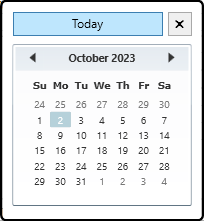
Calendars have a “Today” button.
For ease of use, all calendar icons within MoversSuite Administration now have a Today button. When clicked, it automatically sets the date to the current date. An “X” button has also been added to help when closing the calendar.
INTERNAL REFERENCE:
MOV-1333
BI Tool
One new view has been added to the BI Tool.
The new view is Revenue Branch Audit and this view allows the revenue verification for all branches.
|
BI Tool: Bus. Category |
BI Tool: New View |
Columns |
|
Claims |
Claims Liability Items (ClaimsLiabilityItems) |
The data primarily pulls from the Claims table. See the view for a complete listing. |
New columns have been added to the Quote Summary view.
The Crew Actuals view had the following columns added:
|
BI Tool: Bus. Category |
BI Tool: View |
Added Columns |
|
Billing |
Quote Summary |
OrderStatus |
|
OrderBranch | ||
|
TypeOfMove | ||
|
Commodity | ||
|
AuthorityType | ||
|
ActualDeliveryDate | ||
|
ActualLoadDate | ||
|
BilledDate | ||
|
DetailDescription | ||
|
DetailItemCode | ||
|
DetailItemCodeDescription | ||
|
DetailRateType | ||
|
DetailQuantity2 | ||
|
DetailQuantity | ||
|
DetailRate | ||
|
DetailCharge | ||
|
DetailGroupCharge | ||
|
DetailServiceProviderBillTo | ||
|
DetailServiceProviderVendorNumber | ||
|
DetailServiceProviderVendorName | ||
|
DetailVendorQuotedCharge | ||
|
DetailVendorActualCharge | ||
|
DetailServiceProviderPONumber | ||
|
DetailServiceProviderInvoiceNumber | ||
|
DetailServiceProviderServiceDate |
INTERNAL REFERENCE:
MOV-6936, MOV-6957
MoversSuite Administration: Move Type Setup
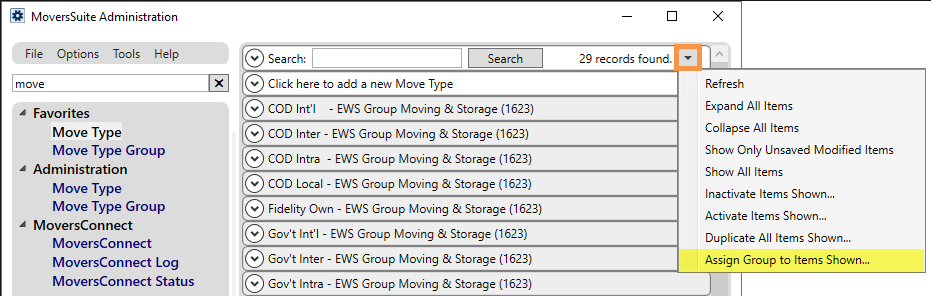
Use a new Mass Record Selection Option to assign a Move Types Group to multiple Move Type records.
Instead of assigning a Move Type Group to Move Type Records one-by-one, use the new Mass Record Selection Option, Assign Group to Items Shown… to assign Move Type Group to multiple records at once.
After using the search to filter records to just the records needed, click the Mass Record Selection Options button. Choose Assign Group to Items Shown to pick a Move Type Group option from the dropdown. The Move Type Group will be applied to all the records.
INTERNAL REFERENCE:
MOV-5423
MoversSuite Administration: Rate Type Setup
Four fields with Rate Type Setup have been renamed.
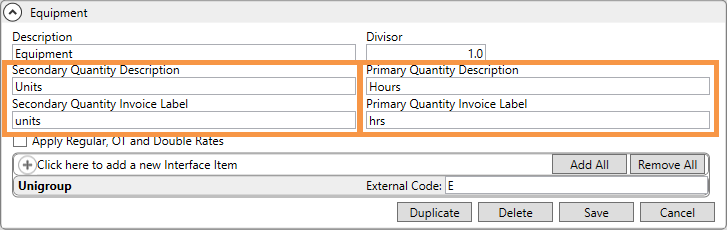
The following chart shows the Rate Type Setup fields that have been renamed and their new field names:
|
New Name |
Previous Name |
|
Secondary Quantity Description |
Quantity One Description |
|
Secondary Quantity Invoice Label |
Quantity One Invoice Label |
|
Primary Quantity Description |
Quantity Two Description |
|
Primary Quantity Invoice Label |
Quantity Two Invoice Label |
This is an image of an example Rate Type Setup record showing the new field labels.
INTERNAL REFERENCE:
MOV-6960
MoversSuite Administration: Credit Warning Lockdown Setup
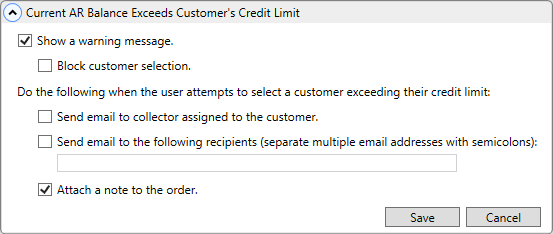
The Setup area was redesigned so that options are indented.
The indents were needed to make the options more apparent.
RELATED INFORMATION:
INTERNAL REFERENCE:
MOV-3825
MoversSuite Administration: Personnel Setup
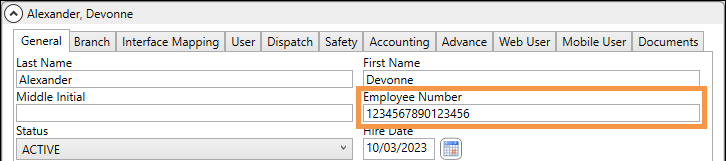
Employee Number field length has been expanded to allow up to 16 characters.
To reflect Customers’ current use, this field now accepts more characters. Reports, processes, and other locations that use this information have been updated to support this change, as well.
INTERNAL REFERENCE:
MOV-6008